IllusoryThrall's Sims 4 Hub
- Challenges, Tips & Stories
Go back to the Main Page
Switch One | Switch Two | Switch Three | Switch Four | Switch Five | Switch Six
This is a step-by-step guide to getting your Sim and game set up for playing The Apartment Switch challenge. I tried to include picture tutorials for everything, so that all the things you have to do are easily understood.
There are two difficulties in Apartment Switch – Normal and Extreme. The normal challenge is for anyone who wants to give this challenge a try, no matter your experience with sims. There is no pass/fail with this challenge. If you need to take longer on a particular Switch, that’s perfectly alright, but it will affect your score overall (if, indeed, you decided to keep score). Extreme adds some layers of difficulty and is for more advanced and or brave players who really enjoy building and decorating for your sims.
Your first task is to get a sim ready to move into their new home. There are two basic options for doing this:
This is pretty self-explanatory. Start a “New Game” from the main menu and create your sim. There are no restrictions on traits or aspirations for your sims. Feel free to create them however you see fit. (ON OCCULTS: Cannot be a vampire, however – I explain why later. Aliens and mermaids are okay, though. Mermaid would definitely make things difficult/interesting, but because they do age, they’re not disallowed. Spellcasters may be a bit cheat-y with all their spells, and the immortality potion is NOT allowed, but I’ll leave their inclusion up to you. As for Werewolves, they’re allowed, but the Immortality perk is banned for this challenge.) One of the Switches does require completing a specific aspiration, but that’s not to say you can’t change out and work on other aspirations. Careers aren’t picked in CAS, so we’ll discuss those later.
If you’re coming right off of, say, the Drifter Challenge House 24 (the final house) or Build Newcrest, you can just continue that family and or story by using an heir from the final house/build.
Do keep in mind, though, that they can’t be older than the first day of their Young Adult stage. I’m not restricting how much they have in skills.. but be smart about it. The challenge won’t be fun to play if there isn’t a challenge, so using a “super-sim” (one with really high skills) will be detrimental to your challenge. As in Option A, there are no restrictions on traits or aspirations. Feel free to create them however you want. Three, they cannot be a vampire – I explain why later. (Aliens are okay, however.) Careers are discussed later.
Also, you have to start with a single sim, so bringing other household members from past challenges is a no-no. (Also, no bringing in past household members to your family after starting the Apartment Switch Challenge. Sims you move in must be either game-created – i.e. NPCs or Townies – or brand new “starter” sims that you pre-populated the world with.) To achieve this, split your previous challenge’s household to separate the heir, and then you’re ready to go on.
Once you have your sim created to your satisfaction, save them and move them into Bargain Bend in Willow Creek, shown here:

They’re not going to stay there, but you have some set-up to do before you move them into their first apartment and start playing.
There are a few things you need to do before starting play in your challenge. Remember, our starter sim is still in Bargain Bend in Willow Creek.

Then, go into San Myshuno:

2. Evict all sims living in apartments in San Myshuno. Yes, all of them. Eventually you’ll be building/decorating those apartments too, so it’s easier just to make them empty to start with. To do this, click any apartment that has a grey plumbbob over it:
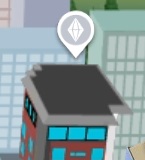

then evict the household through the bottom right menu:
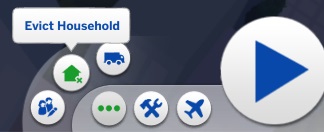
Do this for all the sims living in San Myshuno. There’s no need to delete the evicted households, but you can if you want.
No changes need to be made to any other neighborhood. If you choose, they can even be completely empty.
3a. If you’re playing on Normal, you’re ready to move your sim now. Move them from Bargain Bend in Willow Creek to 910 Medina Studios in San Myshuno. This can be done either in manage worlds or by going into play mode and moving them with the phone.

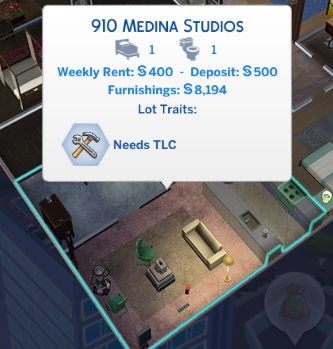
Either way, you move into the apartment unfurnished:

3b. If you’re playing on Extreme, it’s best to take the time and bulldoze all lots in San Myshuno. To bulldoze, click on the lot, then the “build” button in the lower right hand corner:

Then, once it loads, click the bulldoze button in the top middle of your screen:

Then, lastly, back to manage worlds in the upper right of your screen:

Repeat this for all San Myshuno lots – yes, that even includes the commercial lots!
You will need to place elevators, mailboxes, and trash cans on the two penthouses before exiting build mode on those two lots. (The third “penthouse” is actually just a regular house building lot, so it doesn’t need them.) To do this, just click the requirement while you’re in build mode:

Then place down each item needed. It doesn’t really matter where you put them in the penthouse (or on Stargazer Lounge, just so that it has those three items there before you leave build mode. The trash chute will require a wall. I stuck down a trash can instead, and it worked, so whichever you do is just fine. For StarGazer Lounge, don’t add anything but those three items, it will show up as an incomplete venue. Your San Myshuno will look like this – terribly bare, but then, that’s the point of the challenge!

Finally, move your sim into 910 Medina Studios:

Move your sim in with the “bulldoze” option selected:

4. Set Game Options as follows:


Autonomy: Full, Auto age (played sims): yes, Auto age (unplayed sims): checked, Sim Lifespan: Normal, and Fill Empty Homes: Checked.
The challenge ui and traditional social menus are up to your personal preference, as are the other options available.
5. Now, go to play mode with your sim and hit pause. Use control-alt-c to bring up the cheat box:

Type in “testingcheats on”, then “money 0” then “testingcheats off”. Use control-alt-c again to make that cheat box close. You should have seen all your sim’s money magically disappear.
6. You’re all ready, now go to the Switch One page to find the rules for your first Switch challenge. I put each Switch on a separate page so those who don’t want spoilers of what’s coming will be safe.
Go back to the Main Page
Switch One | Switch Two | Switch Three | Switch Four | Switch Five | Switch Six

 BIG ANNOUNCEMENT!!
 Chapter One – Starting Anew
 November 2025 Dev DiarySuperSweetBot Commands for Mods & BroadcastersOctober 2025 Dev DiaryProgress Report!Hacking Situation ResolvedHey all…
 Welcome to my new webhost!!
 Progress Report on Not So Berry & TimelineExtended Not So Berry 2.0 is coming!!
 OMG A Thrall Post?? What?Not So Berry Updating
 Jaynie’s Gems: By-The-NumberToday