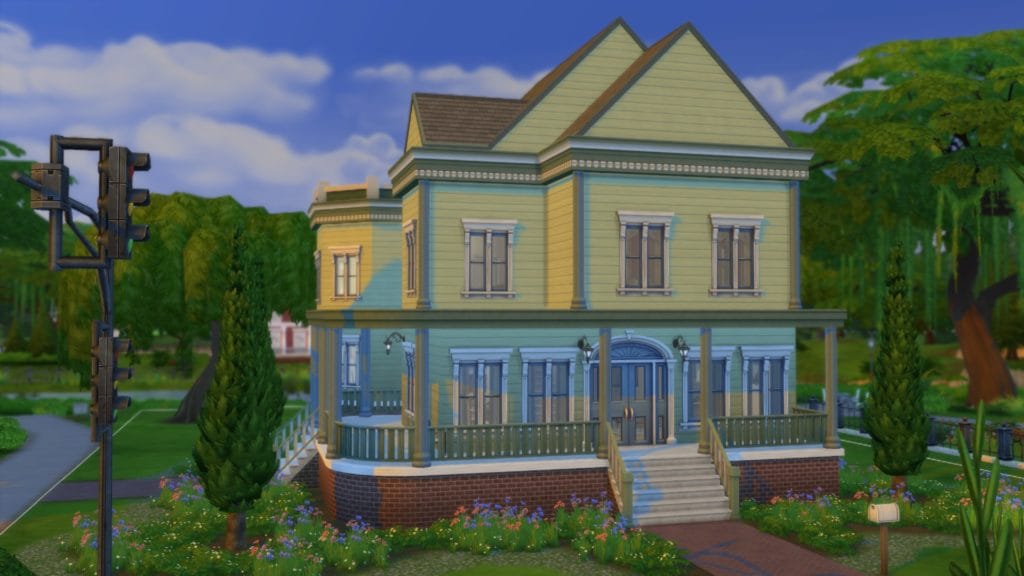
This is sort of a companion challenge to my Build-A-Pack Challenge, only easier and less specific. Even a beginning builder can attempt this with plenty of success and learn a lot along the way. The premise of this challenge is to take a standard EA-built world.. take out all the sims.. and remodel the homes (and venues), one at a time. Every lot is fair game, and the possibilities are endless. The only thing I ask, and the major rule is this: no bulldozing. This is a remodel – whether it be just the furnishings and paint, or including additions like annexes, more floors, basements, pools, greenhouses, etc. My personal goal will be to keep the spirit of each house or venue somewhere in each remodel, but if you really want to change things up, you can move nearly everything around. Also, keeping the lot designation (residential stays residential, commercial stays commercial) is a good idea.. but it’s less of a rule and more of a suggestion. It may be that you find a home that would make a perfect restaurant, or vice versa. The only lots you absolutely cannot change designation for are the special lots in Windenburg (Bluffs, Ancient Ruins, and Von Haunt Estate.) and the lots in the two “vacation” worlds of Granite Falls and Selvadora. This is to keep those lots playable.
Getting Started:
Create a sim. Any sim. They won’t matter in the long run, and will end up just sitting in the household management screen.
Move said sim into a lot. Any lot. Pick any season you want (it won’t matter). Pause game play, then save and go to the manage world screen.
Evict all sims from all lots. There’s no reason to delete them, as you won’t be playing any of them, but if you really feel like it, go ahead and send them into the nether. *evil smile, waving goodbye to the annoying townies*
SAVE YOUR GAME. (I include this step because it’s so easy to forget to do this.)
You’re ready to play. For each house there are five basic steps:
Pick a lot you want to work with in any EA neighborhood. This includes the vacation and jungle adventures lots, and even the apartments in San Myshuno.
Take a look around the lot to get a good idea of what’s already there, and brainstorm what you think it’s missing, or what you want to change.
Build!
Take the name of the lot and add “Remodel” or “Flipped” after it.
Save and Share! When you’re finished with each house, don’t forget to upload it to the gallery with the hashtag #flippinglots so others can find and download to see what everyone else has done. Also, I again remind you to save the game. Uploading will save the lot to your library, but if you want to keep all the lots together in this save file, saving is a must. (Apartments are a bit harder to upload, but it can be done. You have to delete a wall between each room so it’s all one big room and upload the entire apartment that way. Then when you download it, just put the wall back in and you’re set to go.)
Once you’ve gone through all of the EA default lots, remember to check the lots from the user MaxisCreator_01. There are official EA lots there that aren’t in the base game when loaded, and most of them could use a remodel, too. Put these in those “annoying” blank lots, and you’ll fill up your world quite quickly. You’ll only get better at building by practicing!
How to Play/ Rules/ Suggestions:
No bulldozing
NO CC. This is to make the houses available on the gallery to everyone. If you choose to use CC, please state so in the description on the gallery.
DON’T change the lot designation for the special lots in Windenburg (Bluffs, Ancient Ruins, and Von Haunt Estate.) and the lots in the two “vacation” worlds of Granite Falls and Selvadora. This is to keep those lots playable. You can remodel the lots, but keep the designation (i.e. rental stays a rental, etc) the same.
There is no target value for each house. In other words, it can be as expensive or cheap as you choose. Since you’re building straight from the manage world screen and not loading a family, no money cheats are needed and you have unlimited funds for each build.
Don’t forget landscaping. I’m notoriously bad at this, so asking that each house also include landscaping is a bit of a challenge to myself to get better at it.
Move objects cheat is allowed. This is especially useful in landscaping.
Try to make the houses “livable”. In other words, if someone wanted to download the house and use it for one of their game play families, things wouldn’t have to be moved around to be accessed and used.
Don’t forget there’s different mailboxes and outside trashcans to be used, too.
Feel free to use buydebug items, but again, remember the houses are supposed to be livable. Don’t clutter them up too much! *wink*
Don’t forget you can sort items in the bin by pack, color, etc.
Be creative. Let your imagination be your guide. The options and possibilities are pretty much endless.
I am a 47 year old American wife, mother, and gamer. I’ve lived in the Midwest most of my life, and enjoy it for the changing seasons. My favorite movie is Labyrinth, my favorite game is Sims 4, and I have tattoos related to both. My favorite colors are purple, red, and green. When I’m not playing games (which is rare) I also enjoy reading and crafting. I’m also an animal lover, and have had many types of pets over the years. Currently, I have a dog named Cassie who is a Jack Russel / Beagle mix and five young fancy rats (all of whom are rescues). I run this Sims 4 Blog where I post screenshots and stories about the different challenges I play. Also here are the Sims 4 challenges I've written, and a place for me to store all the Sims 4 knowledge I've gotten over the years. I am also a Sims 4/variety streamer on Twitch for my mental health, fun, and to meet new people. I am also in the EA Creator Network and an Ubisoft Partner, which is a dream come true! I look forward to meeting you!
To provide the best experiences, we use technologies like cookies to store and/or access device information. Consenting to these technologies will allow us to process data such as browsing behavior or unique IDs on this site. Not consenting or withdrawing consent, may adversely affect certain features and functions.
Functional
Always active
The technical storage or access is strictly necessary for the legitimate purpose of enabling the use of a specific service explicitly requested by the subscriber or user, or for the sole purpose of carrying out the transmission of a communication over an electronic communications network.
Preferences
The technical storage or access is necessary for the legitimate purpose of storing preferences that are not requested by the subscriber or user.
Statistics
The technical storage or access that is used exclusively for statistical purposes.The technical storage or access that is used exclusively for anonymous statistical purposes. Without a subpoena, voluntary compliance on the part of your Internet Service Provider, or additional records from a third party, information stored or retrieved for this purpose alone cannot usually be used to identify you.
Marketing
The technical storage or access is required to create user profiles to send advertising, or to track the user on a website or across several websites for similar marketing purposes.

 BIG ANNOUNCEMENT!!
 Chapter One – Starting Anew
 November 2025 Dev Diary
 Welcome to my new webhost!!
 Progress Report on Not So Berry & Timeline
 OMG A Thrall Post?? What?
 Jaynie’s Gems: By-The-Number